Author: Akshay

  • Writesonic vs AssemblyAI: Best AI Tools Compared (2026)

    Writesonic vs AssemblyAI: Best AI Tools Compared (2026)

    PickedMyAi

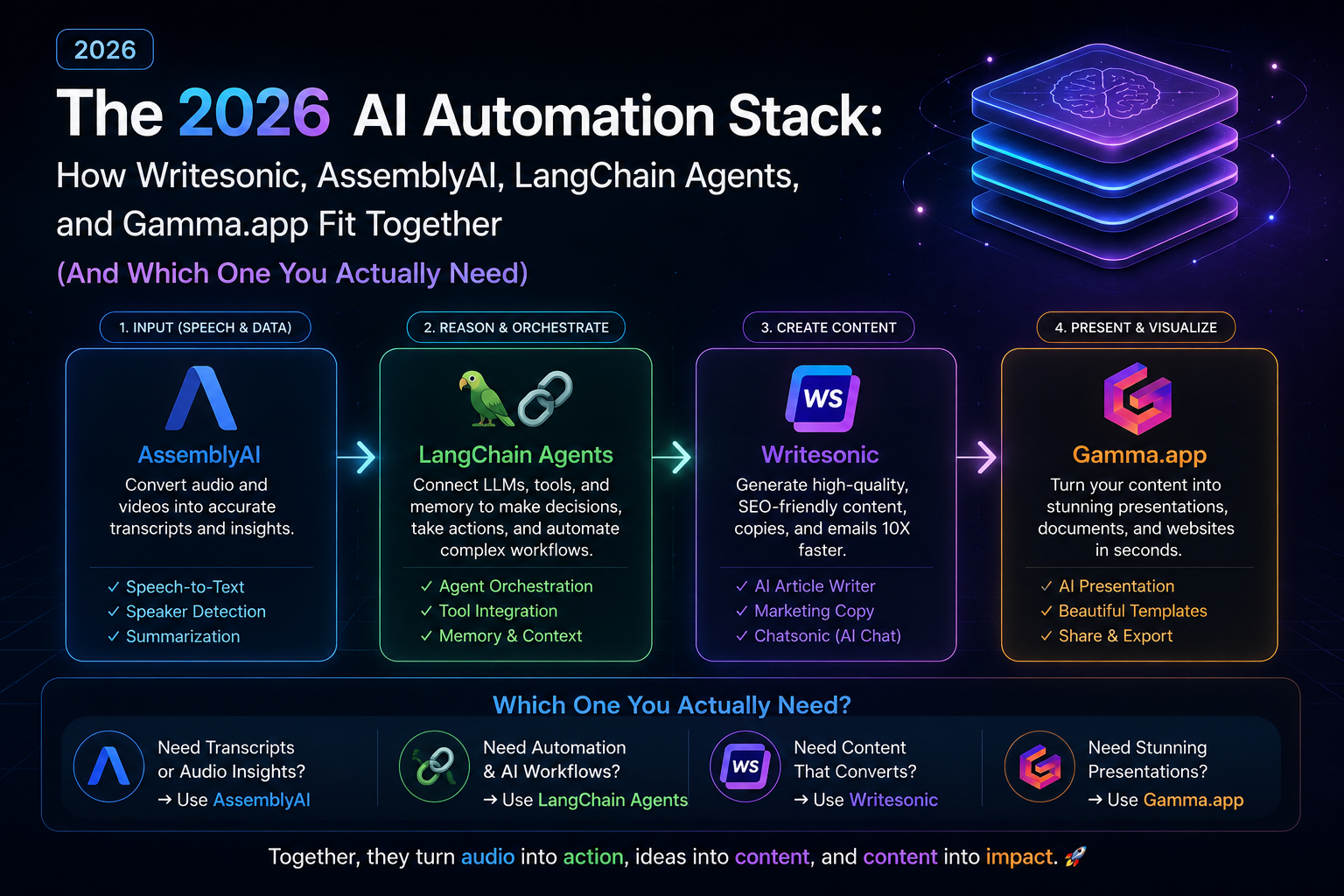
    When people search Writesonic vs AssemblyAI, they’re usually trying to solve one of two problems: which tool to buy, or how these tools even fit together in a real workflow. The honest answer is that Writesonic, AssemblyAI, LangChain automation, and Gamma.app aren’t competitors. Each one handles a different stage of an AI-powered pipeline, and most serious 2026 workflows use three or four of them together.

    This guide compares all four directly, includes a working LangChain autonomous agent tutorial, and ends with a decision framework so you know exactly what to use and when.


    Writesonic vs AssemblyAI vs LangChain vs Gamma.app: Quick Comparison Table

    ToolCategoryCore JobBest For
    WritesonicContent generationTurns ideas into publishable textMarketers, content agencies
    AssemblyAISpeech-to-text APITurns audio into structured textDevelopers, call/meeting analytics
    LangChainAutomation frameworkChains LLM calls into autonomous agentsDevelopers building multi-step workflows
    Gamma.appPresentation designTurns text into designed decksFounders, consultants

    Writesonic vs AssemblyAI: Key Differences

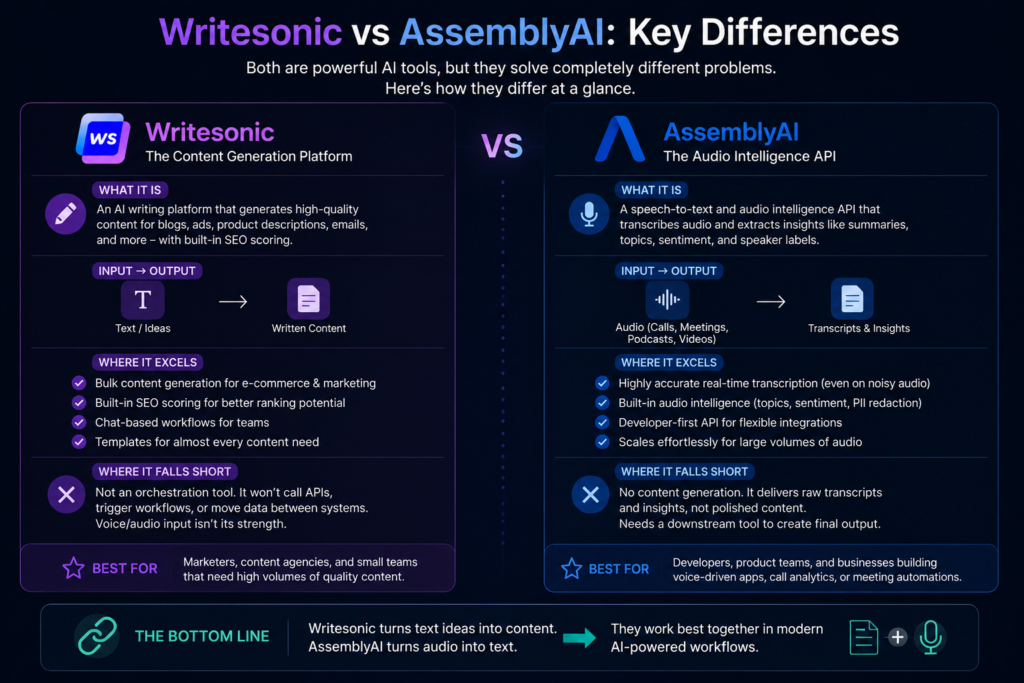
    The Writesonic vs AssemblyAI comparison confuses people because both get filed under “AI tools,” but they don’t overlap at all.

    Writesonic is a content-generation platform. It writes blog posts, ad copy, and product descriptions, with built-in SEO scoring so output isn’t just generic filler. It’s built for volume: e-commerce catalogs, bulk ad variations, chat-based drafting for teams that don’t want to prompt-engineer from scratch.

    AssemblyAI is a speech-to-text and audio intelligence API. It takes calls, meetings, or podcast audio and converts it into transcripts, summaries, sentiment tags, and speaker labels. On its own, it stops at the transcript stage, generating the actual finished output (a report, an email, a summary) is someone else’s job, whether that’s Writesonic or a LangChain-based agent picking up from there. A simple way to remember the split: text going in and more text coming out points to Writesonic. Audio going in points to AssemblyAI, but it always needs a second tool to carry the work across the finish line.

    LangChain Automation & Autonomous Agents: The Reasoning Layer

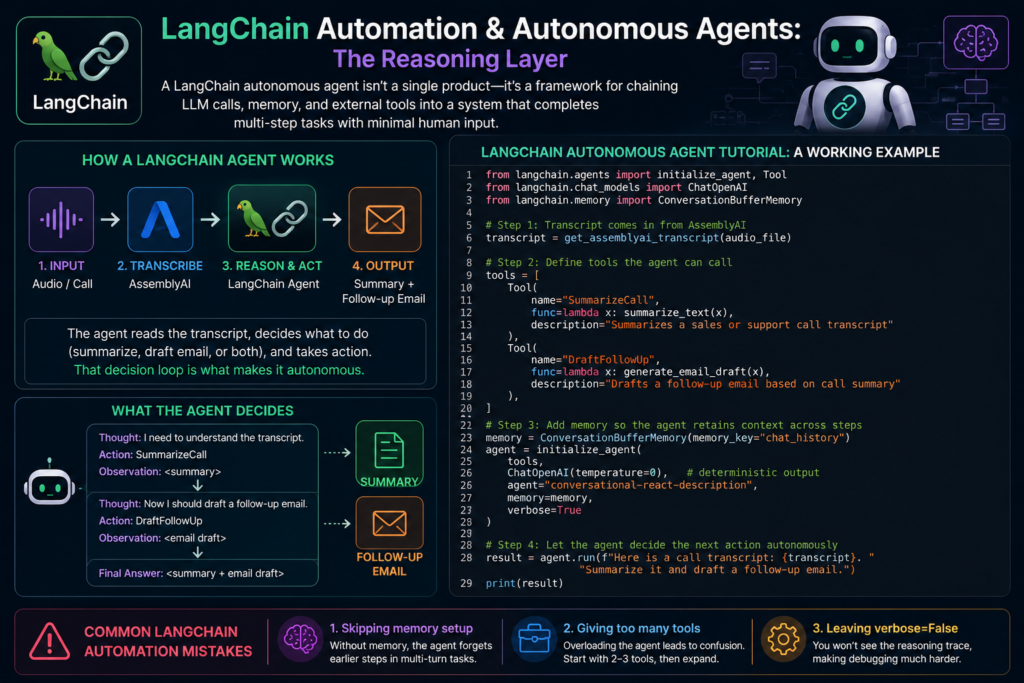
    A LangChain autonomous agent isn’t something you download and open, it’s more like a blueprint for wiring together language model calls, stored context, and outside tools so the whole system can work through several steps on its own, without someone approving each move.

    LangChain Autonomous Agent Tutorial: A Working Example

    Here’s an agent that takes an AssemblyAI transcript and decides on its own whether to summarize it, draft a follow-up email, or both:

    python

    from langchain.agents import initialize_agent, Tool
    from langchain.chat_models import ChatOpenAI
    from langchain.memory import ConversationBufferMemory
    
    # Step 1: Transcript comes in from AssemblyAI
    transcript = get_assemblyai_transcript(audio_file)
    
    # Step 2: Define tools the agent can call
    tools = [
        Tool(
            name="SummarizeCall",
            func=lambda x: summarize_text(x),
            description="Summarizes a sales or support call transcript"
        ),
        Tool(
            name="DraftFollowUp",
            func=lambda x: generate_email_draft(x),
            description="Drafts a follow-up email based on call summary"
        ),
    ]
    
    # Step 3: Add memory so the agent retains context across steps
    memory = ConversationBufferMemory(memory_key="chat_history")
    agent = initialize_agent(
        tools,
        ChatOpenAI(temperature=0),
        agent="conversational-react-description",
        memory=memory,
        verbose=True
    )
    
    # Step 4: Let the agent decide the next action autonomously
    result = agent.run(f"Here is a call transcript: {transcript}. Summarize it and draft a follow-up email.")
    print(result)

    Common LangChain Automation Mistakes

    1. Skipping memory setup, so the agent forgets earlier steps in multi-turn tasks
    2. Giving the agent too many tools at once instead of starting with 2 to 3
    3. Leaving verbose=False during development, which hides the reasoning trace needed for debugging
    Gamma.app: The Presentation Layer

    Gamma converts plain text, outlines, or summaries into a designed deck in seconds. It’s fast and clean for internal decks and pitch drafts, though it offers less pixel-level control than manual design tools and isn’t built for chart-heavy, data-dense presentations.


    Who Should Use What?

    • You’re a marketer scaling blog or ad outputWritesonic
    • You’re processing calls, meetings, or podcasts → AssemblyAI
    • You’re building a workflow that needs to make decisions across steps → LangChain automation
    • You need a polished deck fast, from existing text → Gamma.app
    • You’re not sure which of these fits your workflow → Start with the free tiers of AssemblyAI and Writesonic; add LangChain once you need multi-step logic connecting them
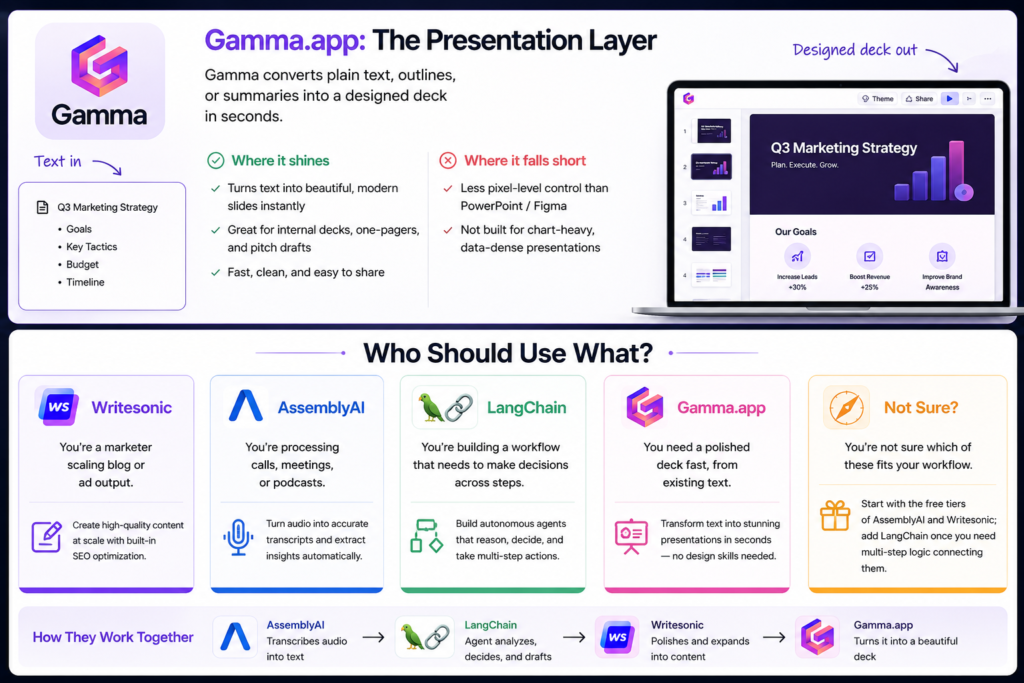
    The Full Pipeline: How They Work Together

    1. AssemblyAI transcribes a sales call or meeting
    2. A LangChain agent reads the transcript and drafts a summary plus action items
    3. Writesonic polishes that summary into a client-ready report
    4. Gamma.app turns the final output into a shareable deck

    FAQs

    Is LangChain a tool or a framework? A framework, a set of building blocks for chaining LLM calls, memory, and external tools into an agent.

    Can AssemblyAI and Writesonic be used together? Yes. AssemblyAI transcribes audio, and Writesonic turns that transcript into polished content.

    Do I need to code to build a LangChain autonomous agent? Basic Python is recommended, though no-code agent builders exist for simpler use cases.

    Is Gamma.app free? Gamma has a free tier with generation limits; paid plans add more exports and branding controls.


    Conclusion

    The Writesonic vs AssemblyAI debate, and the wider question of where LangChain and Gamma.app fit, comes down to one idea: these tools solve different problems in the same pipeline. Match the tool to the stage of your workflow, not the other way around.

    Ready to pick your stack? [Explore our full AI tool comparison hub →]

  • ChatGPT vs Claude vs Perplexity: Best AI 2026

    ChatGPT vs Claude vs Perplexity: Best AI 2026

    PickedMyAi

    ChatGPT vs Claude vs Perplexity: Which AI Assistant Actually Deserves a Spot in Your 2026 Toolkit?

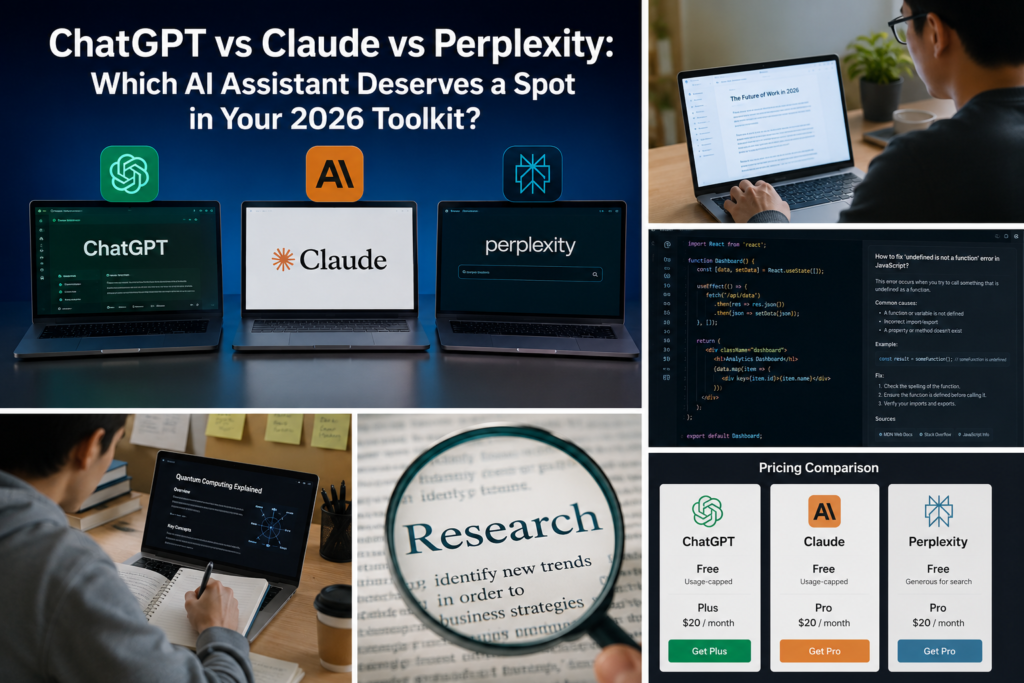
    If you’ve opened three browser tabs trying to decide between ChatGPT vs Claude vs Perplexity, you’re not alone. Every one of these tools claims to be “the best AI assistant,” and honestly, all three are right — just for different jobs. The real question isn’t which one wins overall. It’s which one wins for what you’re actually trying to do.

    This isn’t a benchmark-score dump. It’s a practical ChatGPT vs Claude vs Perplexity comparison based on what each AI assistant is genuinely built for, so you spend your next subscription rupee (or dollar) on the right tool—not the loudest one.

    Table of Contents

    The 30-Second Verdict

    ChatGPTClaudePerplexity
    Best atAll-round versatility, images, voiceLong documents, careful writing, codingLive research with sources
    Weakest atCan feel generic without steeringNo native image generationNot built for creative or long-form writing
    Free tierYes, usage-cappedYes, usage-cappedYes, generous for search
    Paid tier starts at~$20/mo~$20/mo~$20/mo
    Pick it if youWant one tool for everythingWrite, edit, or code for a livingNeed answers with receipts

    When people search ChatGPT vs Claude vs Perplexity, they’re usually trying to solve one specific problem — not asking which app is “smartest” in general. That’s the lens this whole comparison uses.

    Before diving deeper into ChatGPT vs Claude vs Perplexity, it’s worth remembering that each platform has a different strength. Choosing the right AI assistant depends on whether your priority is writing, coding, research, or everyday productivity.

    Writing and Content Creation

    ChatGPT is the fastest tool to get something out of — outlines, captions, quick drafts, brainstorms. It rarely leaves you staring at a blank response, which makes it the default for people who write occasionally rather than professionally.

    Claude takes the opposite approach: slower to prompt, but the output usually needs less editing afterward. It holds context across long documents better, which matters if you’re revising a 4,000-word report instead of writing a 200-word Instagram caption. If your blog or newsletter output is long-form and needs a consistent voice, Claude tends to hold that voice more reliably across a session.

    When comparing ChatGPT vs Claude vs Perplexity for developers, the biggest differences come down to context handling, debugging, and access to current documentation.

    Coding and Technical Work

    This is where the three tools separate the most.

    • ChatGPT is a strong generalist coder — good for quick scripts, debugging one function, or explaining an error message.
    • Claude is the one most developers reach for when a task spans multiple files or needs sustained reasoning across a codebase, thanks to how it tracks context over longer sessions.
    • Perplexity isn’t a coding tool at all — but it’s genuinely useful for looking up why something broke, since it pulls current documentation and forum answers with sources attached, instead of guessing from training data.

    One of the biggest deciding factors in the ChatGPT vs Claude vs Perplexity debate is research quality. If you rely on accurate, up-to-date information, this section will likely influence your choice the most.

    Research and Real-Time Information

    This is Perplexity’s entire reason for existing. It doesn’t just answer — it shows its work, linking every claim back to a source you can actually check. If you’re comparing products, fact-checking a claim, or need today’s information (not last year’s), it’s built for exactly that.

    For an independent look at how these models perform on standardized tasks, LMArena’s leaderboard is a useful external reference to cross-check any comparison — including this one.

    Pricing alone won’t decide the winner in ChatGPT vs Claude vs Perplexity because all three offer similar subscription plans. What matters more is which AI tool fits your daily workflow.

    Pricing: What You’re Actually Paying For

    All three follow a similar shape — a usable free tier, and a roughly $20/month plan that removes rate limits and unlocks the stronger underlying model. None of them are dramatically cheaper or more expensive than the others at the entry level, so price shouldn’t be your deciding factor. Fit should be.

    After testing ChatGPT vs Claude vs Perplexity across writing, coding, and research tasks, here’s who should choose each platform.

    Who Should Pick What

    • Students and casual users → ChatGPT. One app, one login, handles homework help, quick research, and image generation without switching tools.
    • Writers, editors, and developers working on real projects → Claude. The consistency across long sessions pays off the more serious the work gets.
    • Marketers, researchers, and anyone who needs to double-check a fact before publishing it → Perplexity. Sourced answers save you the second Google search.

    Worth remembering though: none of these tools replace actually learning something. Sonam Wangchuk has spent decades promoting hands-on, experience-based learning instead of rote memorization. If you’re interested in how his ideas connect with AI and innovation, check out our guide on Sonam Wangchuk’s AI innovation and education philosophy. That same principle applies to AI tools—they’re brilliant at giving you answers, but they won’t teach you how to think unless you actively engage with them.

    Read more: ChatGPT vs Claude vs Perplexity: Best AI 2026

    FAQs

    ChatGPT vs Claude vs Perplexity: Which is better for beginners? ChatGPT, since it’s the most general-purpose and forgiving of vague prompts. It’s usually the easiest starting point before you know exactly what you need.

    Can I use ChatGPT, Claude, and Perplexity together? Yes. Many people run ChatGPT for quick daily tasks, Claude for long or code-heavy work, and Perplexity for anything that needs a cited source — the free tiers make this combination affordable.

    In the ChatGPT vs Claude vs Perplexity comparison, which AI is best for coding? Claude generally holds up better on multi-file projects and longer coding sessions, while ChatGPT is a solid pick for quick, self-contained scripts.

    The Real Takeaway

    If you’re still deciding after this ChatGPT vs Claude vs Perplexity comparison, explore our AI Compare Tool to evaluate more than 500 AI tools by pricing, features, ratings, and use cases. You can also browse our complete AI Tools Directory to discover the best alternatives for your workflow.


    Conclusion

    There’s no single “winner” in the ChatGPT vs Claude vs Perplexity debate, because these three tools aren’t really competing for the same job. Reach for ChatGPT when you want one app that handles almost anything without much setup. Lean on Claude when the task involves serious writing or code that needs to hold together across a long session. And keep Perplexity open when you need an answer backed by a source you can actually click through and verify. The “best” one isn’t fixed — it just depends on what you’re sitting down to do.