Category: Artificial intelligence

Explore the latest news, tutorials, tools, and trends in artificial intelligence. Discover updates on ChatGPT, Claude, Gemini, AI startups, machine learning, generative AI, automation, and emerging technologies shaping the future.

  • Autonomous Agents: 7 Powerful Secrets to Building Smarter AI

    Autonomous Agents: 7 Powerful Secrets to Building Smarter AI

    Autonomous agents are no longer a research fantasy, they are one of the most talked-about breakthroughs in applied AI today. If you have watched a script plan its steps, call tools on its own, and correct its mistakes, you have seen this technology at work. This guide breaks down, step by step, how these intelligent systems are built using two of the most popular frameworks in the space, LangChain and AutoGPT, and shows you a clear, practical path to building one yourself.

    By the end of this article you will know what the term actually means, how LangChain and AutoGPT treat the same problem differently, and which framework is better for your project. We’ll also compare both tools side-by-side, walk through a real build, and share best practices used by experienced teams when shipping these systems to production. By the end of this article, you will understand what the term actually means, how LangChain and AutoGPT approach the same problem differently, and which framework fits your project. We will also compare both tools side by side, walk through a real build, and share best practices that experienced teams use when they ship these systems to production.

    Table of Contents

    1. What Are Autonomous Agents?
    2. How LangChain Builds Intelligent Agents
    3. How AutoGPT Builds Intelligent Agents
    4. LangChain vs AutoGPT: A Direct Comparison
    5. Step-by-Step: Building Your First Agent
    6. Real-World Use Cases
    7. Common Challenges When Deploying Agents
    8. Best Practices for Production
    9. Frequently Asked Questions
    10. Conclusion

    What Are Autonomous Agents?

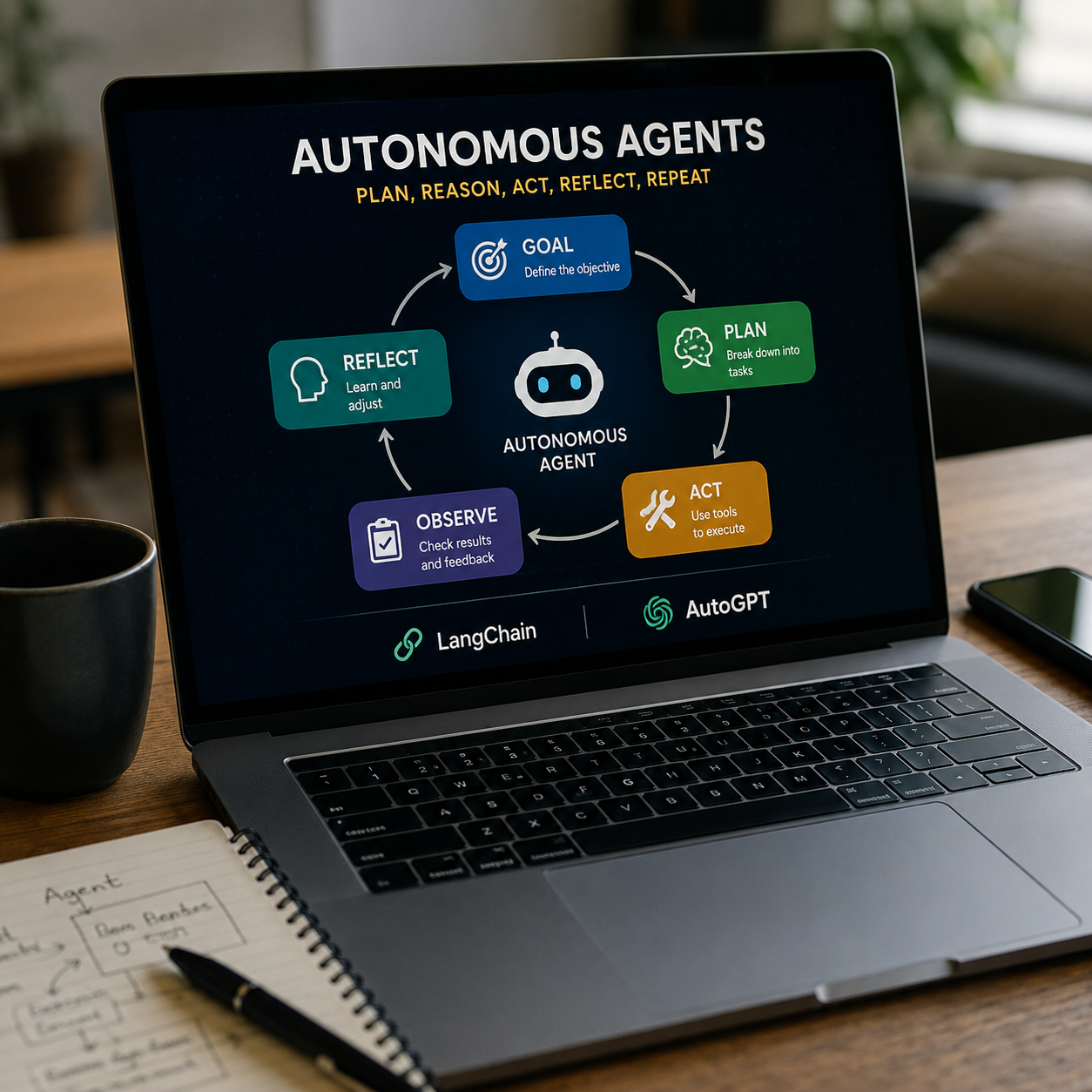
    Autonomous Agents are AI systems that can plan, reason and act with little or no human intervention. Rather than responding to a single prompt, an agent decomposes a goal into sub-tasks, chooses tools to achieve each sub-task, checks the results and determines the next course of action. It is the plan-act-reflect loop that distinguishes a simple chatbot from a real self-directing system.

    Most modern autonomous agents have 3 main components: a reasoning engine (usually a large language model), a memory system to keep track of progress, and a set of tools such as web search, code execution, or file access. This pattern is implemented by both LangChain and AutoGPT, but they approach it from very different angles in terms of structure and control, and understanding those differences will save you weeks of trial and error.
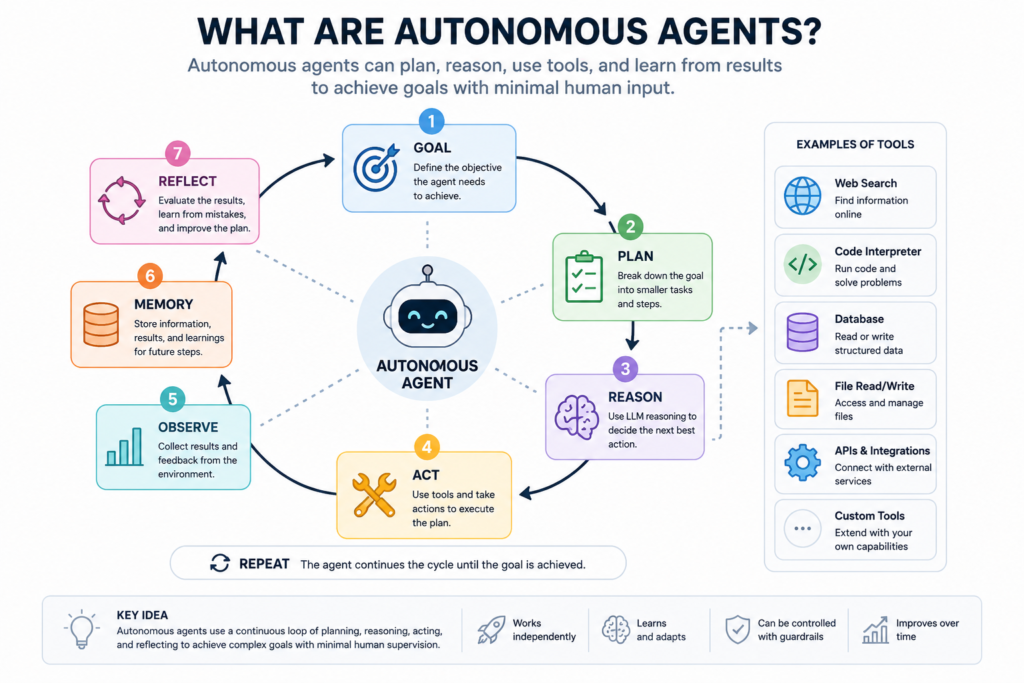
    What are Autonomous Agents AI workflow illustration

    How LangChain Builds Autonomous Agents

    LangChain is a flexible framework, not a finished product. LangChain provides developers with building blocks such as chains, tools, memory modules, and agent executors, which they can combine to create custom autonomous systems. Because LangChain is modular, teams can change the reasoning model, add custom tools, or incorporate a vector database for long-term memory without having to rewrite the entire pipeline from scratch.

    This is why LangChain is a good choice when you want to control your agents’ reasoning and actions in a fine-grained way. The LangChain project site contains official documentation for the full list of integrations, example chains, and community templates to accelerate development.

    Developers often pick LangChain when building a product feature, an internal tool, or an agent that needs to talk to specific company APIs, because each part of the pipeline can be configured and tested on its own before it even gets into production.

    How AutoGPT Builds Autonomous Agents

    AutoGPT does the opposite. It ships as a more fully featured, opinionated application, designed to run with very little setup. It receives a goal stated in natural language and decomposes it into sub-tasks, searching the web, writing and executing code, and looping until the goal is achieved or it decides to ask for more information.

    LangChain provides you with the building blocks. AutoGPT provides you with a whole system, ready to go. You can also check out the project directly in its official GitHub repository, where you can see the latest release notes, community plugins, and setup instructions.

    This makes AutoGPT a suitable option for experimentation, rapid prototyping, and solo projects where speed is more important than fine-tuned control over every decision the agent makes along the way.
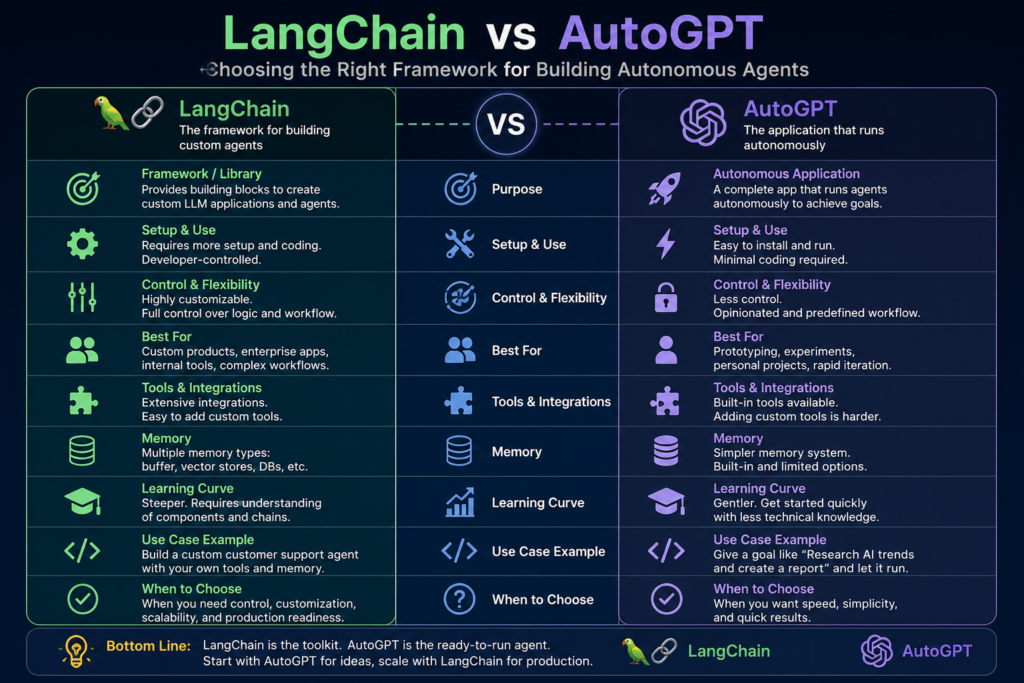
    LangChain vs AutoGPT: A Direct Comparison

    FeatureLangChainAutoGPT
    Setup effortModerate to high, fully customLow, mostly plug-and-play
    Control over logicVery high, developer-definedLimited, mostly automatic
    Best forCustom products, internal toolsPrototypes, experiments
    Memory optionsMultiple, configurableSimpler, built-in only
    Tool integrationExtensive, custom, easy toolsGrowing, less flexible
    Learning curveSteeperGentler
    Community sizeLarge, enterprise-heavyLarge, hobbyist-heavy

    If you want a framework that you can shape around your exact use case, LangChain wins. If you want results in minutes, AutoGPT wins. Many teams start with Auto-GPT to quickly validate an idea, then move to LangChain when they need production-grade control and predictable costs.

    Step-by-Step: Building Your First Agent

    1. Define the goal clearly. Autonomous agents perform best with a specific, measurable objective rather than a vague instruction that leaves too much room for interpretation.
    2. Choose your framework. Pick LangChain for control, or AutoGPT for speed, based on the comparison above and your team’s timeline.
    3. Connect your tools. Grant the agent access to web search, a code interpreter, or your own internal APIs and databases.
    4. Add memory. Even a simple memory buffer helps the agent avoid repeating failed steps across a long-running task.
    5. Set guardrails. Limit how many steps, tokens, or tool calls the agent can make before it must stop and ask for review.
    6. Test with small goals first. Small wins reveal weaknesses before you trust the system with larger, higher-stakes tasks.
    7. Review the logs. Reading each decision the agent made is the fastest way to improve its prompts and reduce wasted steps.

    Real-World Use Cases

    We already see Autonomous Agents in customer support triage, reading a ticket, searching internal documents, and drafting a response for a human to approve before it goes out. In software teams, agents write small scripts, run tests, and report back results without a developer babysitting every step of the process. Today, even small companies with just a handful of engineers are deploying Autonomous Agents to automate onboarding checklists, data entry, and routine reporting that previously took hours of manual work every single week.

    Research groups use this technique to gather sources,summarize papers,s and generate initial drafts of literature reviews in a fraction of the normal time. Marketing and sales teams also employ this pattern for repetitive research work like competitor analysis or lead enrichment, freeing up humans for the judgment calls a machine can’t make on its own.

    Common Challenges When Deploying Autonomous Agents

    Autonomous Agents are powerful, but they are not infallible. Cost can increase rapidly, as each reasoning step is another model call, and a poorly scoped task can lead to dozens of unnecessary calls. Also, agents can get stuck in loops, repeating the same failed action unaware that the situation is unchanged.

    Another common failure mode is hallucinated tool calls, where the system attempts to use a tool that doesn’t exist or uses it incorrectly. Security is another real concern. The systems can run code or browse the web, so they need strict permission boundaries to ensure that a bad decision cannot cause real damage. Teams that skip this step often regret it when an agent does something unexpected in a live environment with real users watching.

    Best Practices for Production

    Start small and expand scope only after the system proves reliable across many runs. Log every decision so you can debug failures quickly when something goes wrong in production. Set a strict limit on steps, tokens, and cost per run so a runaway loop cannot drain your budget overnight.

    Always include a human in the loop for any non-reversible action, e.g., sending an email or deleting a file, regardless of the confidence the agent appears to have. Finally, review your prompts often. Small wording tweaks can have a big impact on how Autonomous Agents behave in edge cases you didn’t predict during testing. Autonomous Agents are reviewed regularly, not just when something breaks . Their performance could drift over time due to model updates and changing user behavior.

    Our internal breakdown of prompt engineering best practices includes many wording techniques that help make agent instructions more reliable in both frameworks.

    Frequently Asked Questions

    Are Autonomous Agents safe to use in production? They can be, if you add guardrails like step limits, permission scopes, and human review for any irreversible action the agent might try. Most teams also run Autonomous Agents in a sandboxed environment for the first few weeks before providing them with access to production data or customer-facing systems.

    Do I need to know how to code to get started? Basic Python helps a lot, especially with LangChain, but AutoGPT is built to require much less coding experience from the operator.

    Which is better for beginners, LangChain or AutoGPT? AutoGPT is typically easier to get started with, while LangChain pays off the extra learning curve with much more control down the road as your needs grow.

    If you're exploring how AI is shaping the future more broadly, our piece on [Sonam Wangchuk's AI innovation work] covers ten inspiring technologies worth watching. And if you're curious about the newest models powering agent frameworks like these, our [Claude Fable 5 breakdown] is a good next read.

    Conclusion

    Autonomous agents signal a real change to software development, from static scripting to intelligent planning and adaptation. LangChain provides the building blocks for custom production-ready agents, while AutoGPT allows you to set up a working system almost instantly with minimal configuration. Whichever way you go, start small, test often, and put up guardrails before you trust the system with anything important.

    The teams that are getting the most value today are the teams that are treating Autonomous Agents as a powerful tool to supervise closely, not a system to fully hand off without oversight. Nail this balance early and you will be way ahead of most teams still experimenting with the basics of LangChain and AutoGPT.
  • Writesonic vs AssemblyAI: Best AI Tools Compared (2026)

    Writesonic vs AssemblyAI: Best AI Tools Compared (2026)

    PickedMyAi

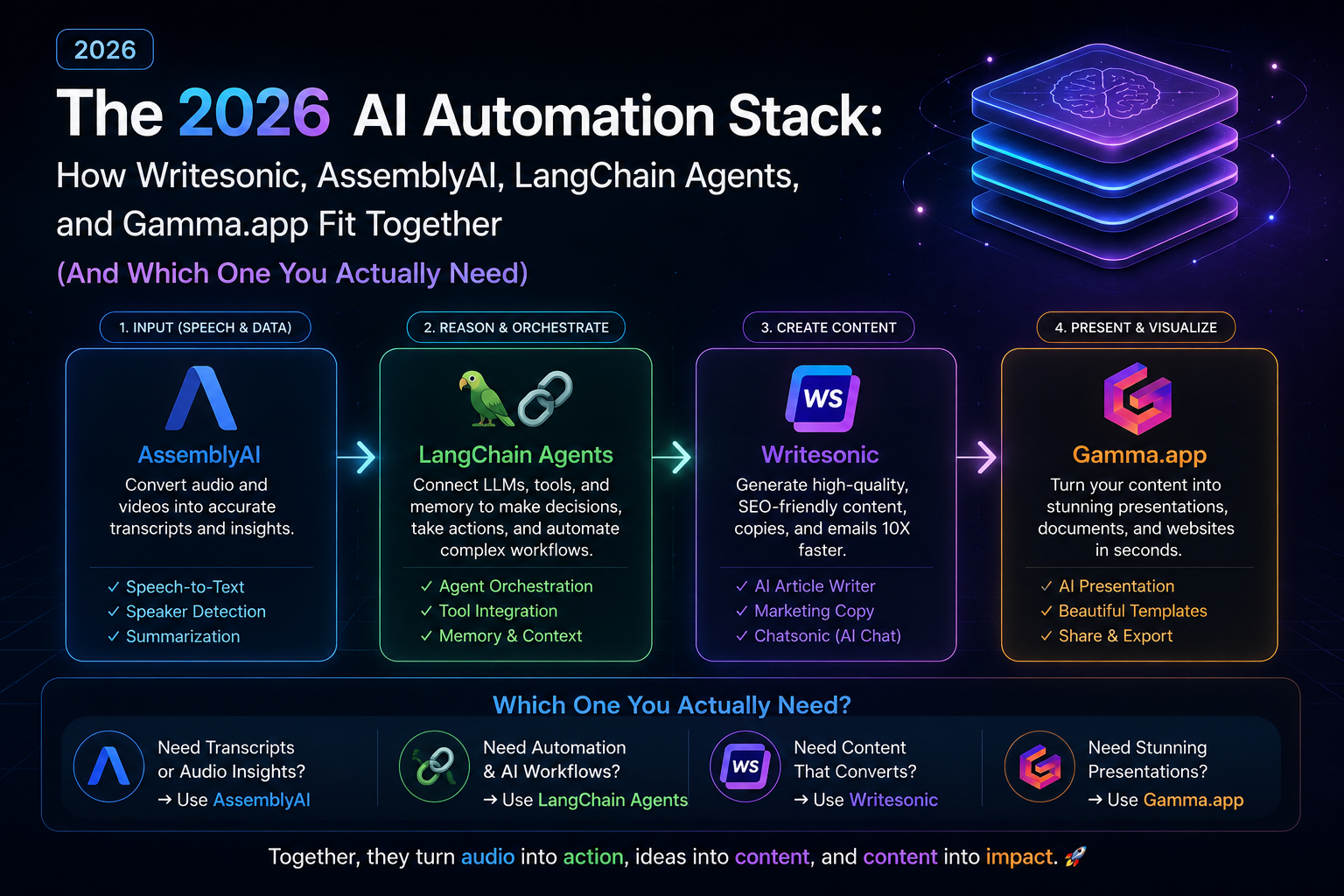
    When people search Writesonic vs AssemblyAI, they’re usually trying to solve one of two problems: which tool to buy, or how these tools even fit together in a real workflow. The honest answer is that Writesonic, AssemblyAI, LangChain automation, and Gamma.app aren’t competitors. Each one handles a different stage of an AI-powered pipeline, and most serious 2026 workflows use three or four of them together.

    This guide compares all four directly, includes a working LangChain autonomous agent tutorial, and ends with a decision framework so you know exactly what to use and when.


    Writesonic vs AssemblyAI vs LangChain vs Gamma.app: Quick Comparison Table

    ToolCategoryCore JobBest For
    WritesonicContent generationTurns ideas into publishable textMarketers, content agencies
    AssemblyAISpeech-to-text APITurns audio into structured textDevelopers, call/meeting analytics
    LangChainAutomation frameworkChains LLM calls into autonomous agentsDevelopers building multi-step workflows
    Gamma.appPresentation designTurns text into designed decksFounders, consultants

    Writesonic vs AssemblyAI: Key Differences

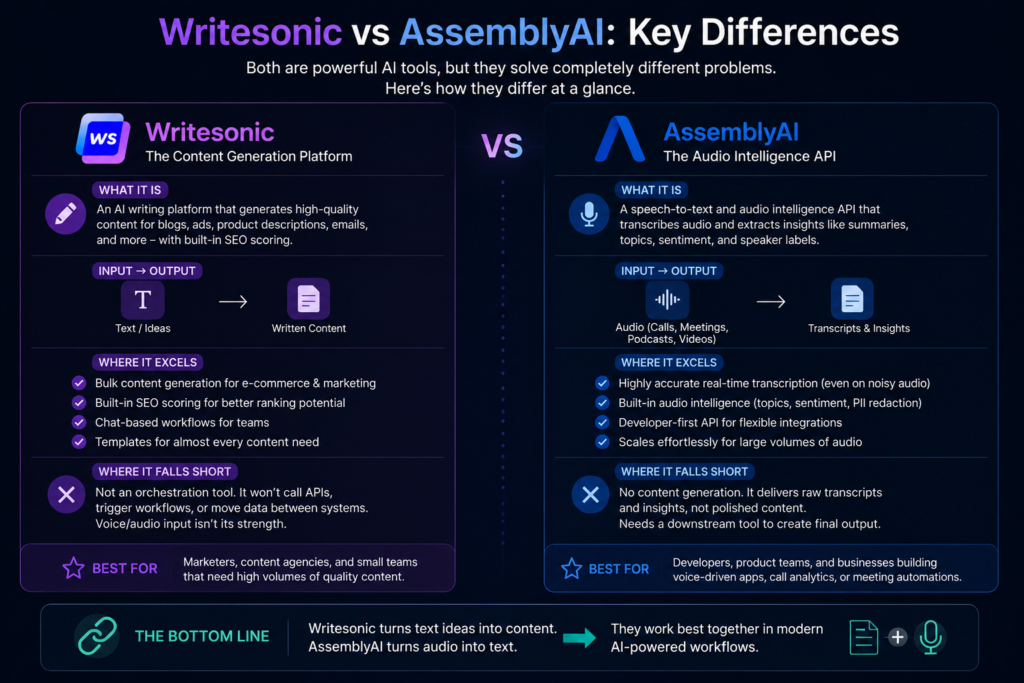
    The Writesonic vs AssemblyAI comparison confuses people because both get filed under “AI tools,” but they don’t overlap at all.

    Writesonic is a content-generation platform. It writes blog posts, ad copy, and product descriptions, with built-in SEO scoring so output isn’t just generic filler. It’s built for volume: e-commerce catalogs, bulk ad variations, chat-based drafting for teams that don’t want to prompt-engineer from scratch.

    AssemblyAI is a speech-to-text and audio intelligence API. It takes calls, meetings, or podcast audio and converts it into transcripts, summaries, sentiment tags, and speaker labels. On its own, it stops at the transcript stage, generating the actual finished output (a report, an email, a summary) is someone else’s job, whether that’s Writesonic or a LangChain-based agent picking up from there. A simple way to remember the split: text going in and more text coming out points to Writesonic. Audio going in points to AssemblyAI, but it always needs a second tool to carry the work across the finish line.


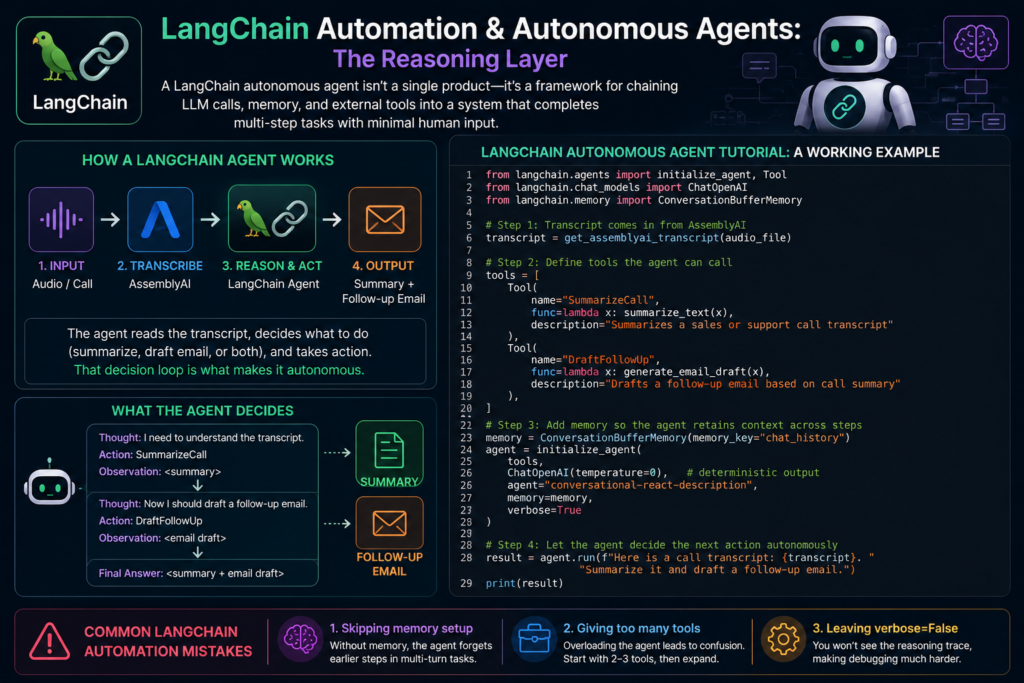
    LangChain Automation & Autonomous Agents: The Reasoning Layer

    A LangChain autonomous agent isn’t something you download and open, it’s more like a blueprint for wiring together language model calls, stored context, and outside tools so the whole system can work through several steps on its own, without someone approving each move.

    LangChain Autonomous Agent Tutorial: A Working Example

    Here’s an agent that takes an AssemblyAI transcript and decides on its own whether to summarize it, draft a follow-up email, or both:

    python

    from langchain.agents import initialize_agent, Tool
    from langchain.chat_models import ChatOpenAI
    from langchain.memory import ConversationBufferMemory
    
    # Step 1: Transcript comes in from AssemblyAI
    transcript = get_assemblyai_transcript(audio_file)
    
    # Step 2: Define tools the agent can call
    tools = [
        Tool(
            name="SummarizeCall",
            func=lambda x: summarize_text(x),
            description="Summarizes a sales or support call transcript"
        ),
        Tool(
            name="DraftFollowUp",
            func=lambda x: generate_email_draft(x),
            description="Drafts a follow-up email based on call summary"
        ),
    ]
    
    # Step 3: Add memory so the agent retains context across steps
    memory = ConversationBufferMemory(memory_key="chat_history")
    agent = initialize_agent(
        tools,
        ChatOpenAI(temperature=0),
        agent="conversational-react-description",
        memory=memory,
        verbose=True
    )
    
    # Step 4: Let the agent decide the next action autonomously
    result = agent.run(f"Here is a call transcript: {transcript}. Summarize it and draft a follow-up email.")
    print(result)

    Common LangChain Automation Mistakes

    1. Skipping memory setup, so the agent forgets earlier steps in multi-turn tasks
    2. Giving the agent too many tools at once instead of starting with 2 to 3
    3. Leaving verbose=False during development, which hides the reasoning trace needed for debugging

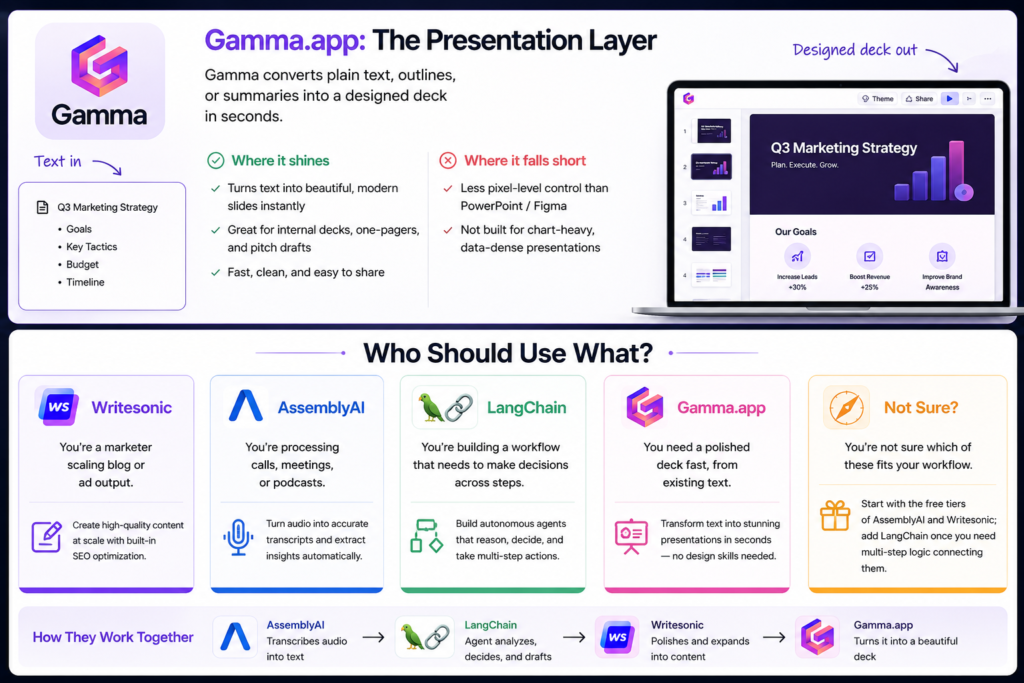
    Gamma.app: The Presentation Layer

    Gamma converts plain text, outlines, or summaries into a designed deck in seconds. It’s fast and clean for internal decks and pitch drafts, though it offers less pixel-level control than manual design tools and isn’t built for chart-heavy, data-dense presentations.


    Who Should Use What?

    • You’re a marketer scaling blog or ad outputWritesonic
    • You’re processing calls, meetings, or podcasts → AssemblyAI
    • You’re building a workflow that needs to make decisions across steps → LangChain automation
    • You need a polished deck fast, from existing text → Gamma.app
    • You’re not sure which of these fits your workflow → Start with the free tiers of AssemblyAI and Writesonic; add LangChain once you need multi-step logic connecting them

    The Full Pipeline: How They Work Together

    1. AssemblyAI transcribes a sales call or meeting
    2. A LangChain agent reads the transcript and drafts a summary plus action items
    3. Writesonic polishes that summary into a client-ready report
    4. Gamma.app turns the final output into a shareable deck

    FAQs

    Is LangChain a tool or a framework? A framework, a set of building blocks for chaining LLM calls, memory, and external tools into an agent.

    Can AssemblyAI and Writesonic be used together? Yes. AssemblyAI transcribes audio, and Writesonic turns that transcript into polished content.

    Do I need to code to build a LangChain autonomous agent? Basic Python is recommended, though no-code agent builders exist for simpler use cases.

    Is Gamma.app free? Gamma has a free tier with generation limits; paid plans add more exports and branding controls.


    Conclusion

    The Writesonic vs AssemblyAI debate, and the wider question of where LangChain and Gamma.app fit, comes down to one idea: these tools solve different problems in the same pipeline. Match the tool to the stage of your workflow, not the other way around.

    Ready to pick your stack? [Explore our full AI tool comparison hub →]

  • ChatGPT vs Claude vs Perplexity: Best AI 2026

    ChatGPT vs Claude vs Perplexity: Best AI 2026

    PickedMyAi

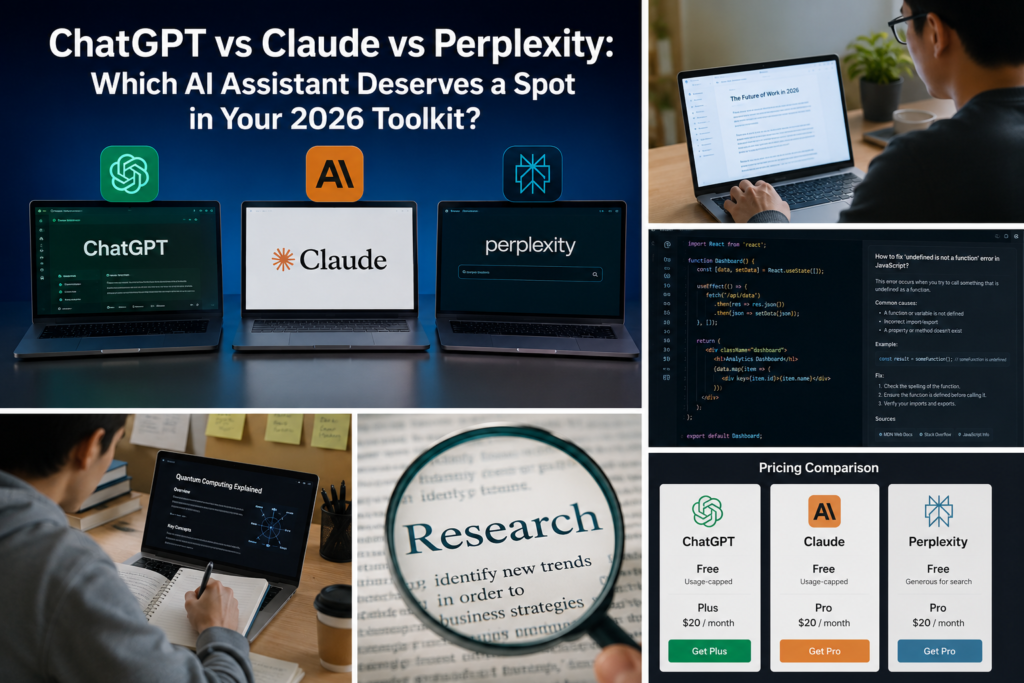
    ChatGPT vs Claude vs Perplexity: Which AI Assistant Actually Deserves a Spot in Your 2026 Toolkit?

    If you’ve opened three browser tabs trying to decide between ChatGPT vs Claude vs Perplexity, you’re not alone. Every one of these tools claims to be “the best AI assistant,” and honestly, all three are right — just for different jobs. The real question isn’t which one wins overall. It’s which one wins for what you’re actually trying to do.

    This isn’t a benchmark-score dump. It’s a practical ChatGPT vs Claude vs Perplexity comparison based on what each AI assistant is genuinely built for, so you spend your next subscription rupee (or dollar) on the right tool—not the loudest one.

    Table of Contents

    The 30-Second Verdict

    ChatGPTClaudePerplexity
    Best atAll-round versatility, images, voiceLong documents, careful writing, codingLive research with sources
    Weakest atCan feel generic without steeringNo native image generationNot built for creative or long-form writing
    Free tierYes, usage-cappedYes, usage-cappedYes, generous for search
    Paid tier starts at~$20/mo~$20/mo~$20/mo
    Pick it if youWant one tool for everythingWrite, edit, or code for a livingNeed answers with receipts

    When people search ChatGPT vs Claude vs Perplexity, they’re usually trying to solve one specific problem — not asking which app is “smartest” in general. That’s the lens this whole comparison uses.

    Before diving deeper into ChatGPT vs Claude vs Perplexity, it’s worth remembering that each platform has a different strength. Choosing the right AI assistant depends on whether your priority is writing, coding, research, or everyday productivity.

    Writing and Content Creation

    ChatGPT is the fastest tool to get something out of — outlines, captions, quick drafts, brainstorms. It rarely leaves you staring at a blank response, which makes it the default for people who write occasionally rather than professionally.

    Claude takes the opposite approach: slower to prompt, but the output usually needs less editing afterward. It holds context across long documents better, which matters if you’re revising a 4,000-word report instead of writing a 200-word Instagram caption. If your blog or newsletter output is long-form and needs a consistent voice, Claude tends to hold that voice more reliably across a session.

    When comparing ChatGPT vs Claude vs Perplexity for developers, the biggest differences come down to context handling, debugging, and access to current documentation.

    Coding and Technical Work

    This is where the three tools separate the most.

    • ChatGPT is a strong generalist coder — good for quick scripts, debugging one function, or explaining an error message.
    • Claude is the one most developers reach for when a task spans multiple files or needs sustained reasoning across a codebase, thanks to how it tracks context over longer sessions.
    • Perplexity isn’t a coding tool at all — but it’s genuinely useful for looking up why something broke, since it pulls current documentation and forum answers with sources attached, instead of guessing from training data.

    One of the biggest deciding factors in the ChatGPT vs Claude vs Perplexity debate is research quality. If you rely on accurate, up-to-date information, this section will likely influence your choice the most.

    Research and Real-Time Information

    This is Perplexity’s entire reason for existing. It doesn’t just answer — it shows its work, linking every claim back to a source you can actually check. If you’re comparing products, fact-checking a claim, or need today’s information (not last year’s), it’s built for exactly that.

    For an independent look at how these models perform on standardized tasks, LMArena’s leaderboard is a useful external reference to cross-check any comparison — including this one.

    Pricing alone won’t decide the winner in ChatGPT vs Claude vs Perplexity because all three offer similar subscription plans. What matters more is which AI tool fits your daily workflow.

    Pricing: What You’re Actually Paying For

    All three follow a similar shape — a usable free tier, and a roughly $20/month plan that removes rate limits and unlocks the stronger underlying model. None of them are dramatically cheaper or more expensive than the others at the entry level, so price shouldn’t be your deciding factor. Fit should be.

    After testing ChatGPT vs Claude vs Perplexity across writing, coding, and research tasks, here’s who should choose each platform.

    Who Should Pick What

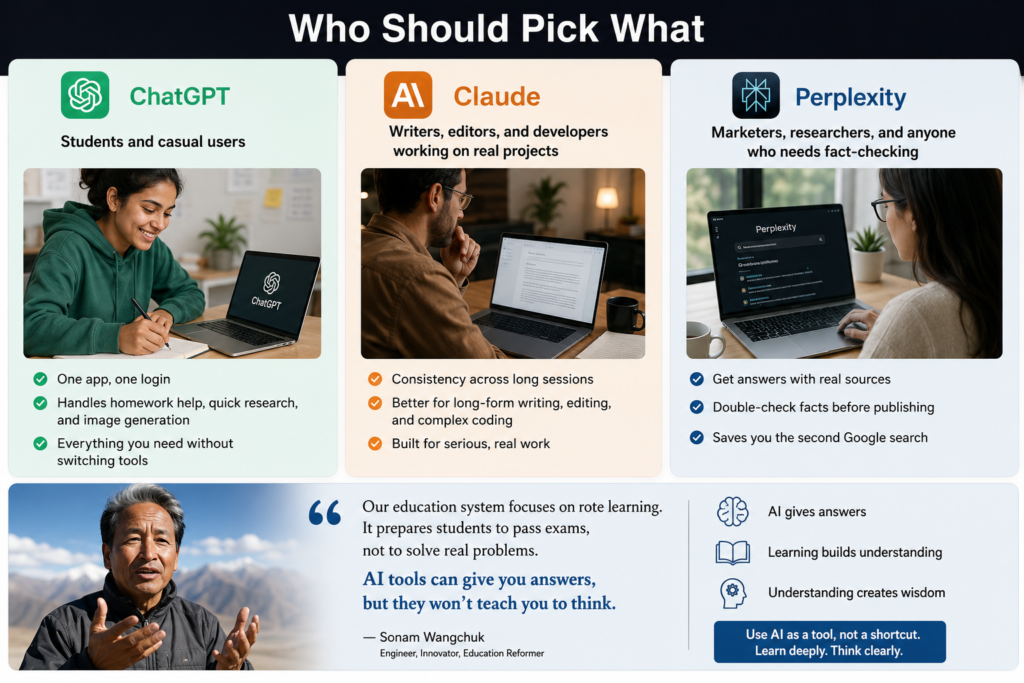
    • Students and casual users → ChatGPT. One app, one login, handles homework help, quick research, and image generation without switching tools.
    • Writers, editors, and developers working on real projects → Claude. The consistency across long sessions pays off the more serious the work gets.
    • Marketers, researchers, and anyone who needs to double-check a fact before publishing it → Perplexity. Sourced answers save you the second Google search.

    Worth remembering though: none of these tools replace actually learning something. Sonam Wangchuk has spent decades promoting hands-on, experience-based learning instead of rote memorization. If you’re interested in how his ideas connect with AI and innovation, check out our guide on Sonam Wangchuk’s AI innovation and education philosophy. That same principle applies to AI tools—they’re brilliant at giving you answers, but they won’t teach you how to think unless you actively engage with them.

    Read more: ChatGPT vs Claude vs Perplexity: Best AI 2026

    FAQs

    ChatGPT vs Claude vs Perplexity: Which is better for beginners? ChatGPT, since it’s the most general-purpose and forgiving of vague prompts. It’s usually the easiest starting point before you know exactly what you need.

    Can I use ChatGPT, Claude, and Perplexity together? Yes. Many people run ChatGPT for quick daily tasks, Claude for long or code-heavy work, and Perplexity for anything that needs a cited source — the free tiers make this combination affordable.

    In the ChatGPT vs Claude vs Perplexity comparison, which AI is best for coding? Claude generally holds up better on multi-file projects and longer coding sessions, while ChatGPT is a solid pick for quick, self-contained scripts.

    The Real Takeaway

    If you’re still deciding after this ChatGPT vs Claude vs Perplexity comparison, explore our AI Compare Tool to evaluate more than 500 AI tools by pricing, features, ratings, and use cases. You can also browse our complete AI Tools Directory to discover the best alternatives for your workflow.


    Conclusion

    There’s no single “winner” in the ChatGPT vs Claude vs Perplexity debate, because these three tools aren’t really competing for the same job. Reach for ChatGPT when you want one app that handles almost anything without much setup. Lean on Claude when the task involves serious writing or code that needs to hold together across a long session. And keep Perplexity open when you need an answer backed by a source you can actually click through and verify. The “best” one isn’t fixed — it just depends on what you’re sitting down to do.