
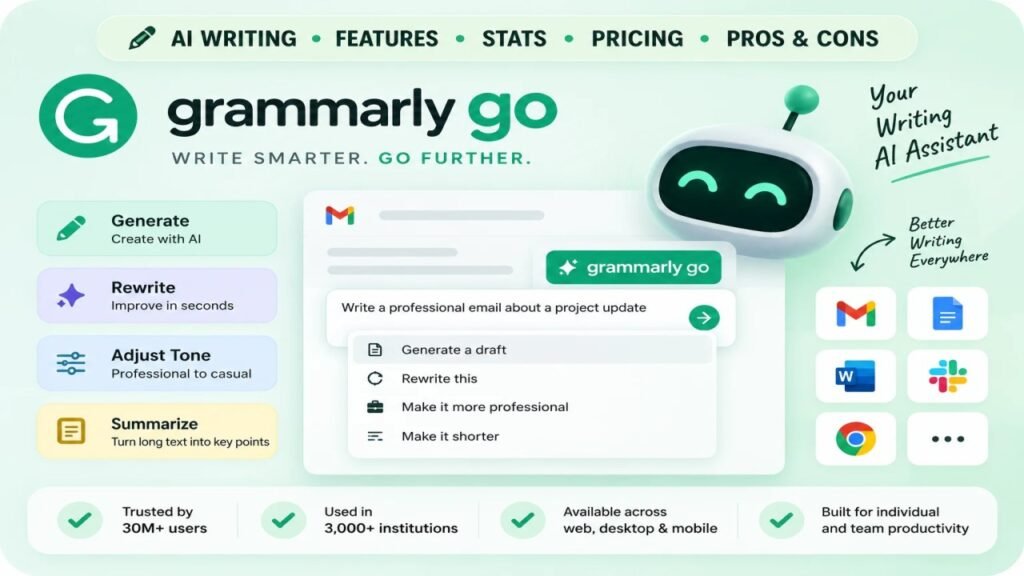
Grammarly Go is the generative AI layer built into Grammarly. Instead of only fixing grammar and spelling, it drafts, rewrites, and adjusts tone on demand, right inside the same editor millions of people already use.
It launched in beta in April 2023 and has since become a core part of every Grammarly plan. In 2026, this AI layer sits inside a broader push called Superhuman Go, but the core generative writing features remain the same.
This review breaks down what Grammarly Go actually does, real usage stats, current pricing, how to use it, and whether it is worth choosing over a standalone AI writing tool.
What Is Grammarly Go?
Grammarly Go is Grammarly’s generative AI writing assistant. It works inside the same browser extension, desktop app, and integrations as regular Grammarly, so there is nothing extra to install.
Unlike Grammarly’s original grammar checker, which only corrects text you already wrote, this AI assistant creates new text from a simple prompt. It can draft an email, summarize a document, or rewrite a paragraph in a different tone in seconds.
Grammarly built the tool on top of large language models, similar to the technology behind ChatGPT. The difference is that it is trained and tuned specifically for writing assistance, not general conversation.
A Short History
Grammarly announced Grammarly Go in March 2023 as its answer to the generative AI wave started by ChatGPT. The beta rolled out the following month across Grammarly’s existing products.
Since launch, the assistant has expanded steadily:
- March 2023: announced as a generative AI product
- April 2023: beta rolls out to Grammarly Free, Premium, and Business users
- Late 2023: adds student-focused prompts and citation guardrails for academic use
- 2024 to 2025: features get folded into simplified Free, Pro, and Enterprise plans
- 2026: becomes part of the broader Superhuman Go ecosystem, extending AI writing support into more workflows
This steady rollout is why Grammarly Go now touches nearly every part of the Grammarly product, from email replies to full document drafting.
Key Stats and Usage Numbers
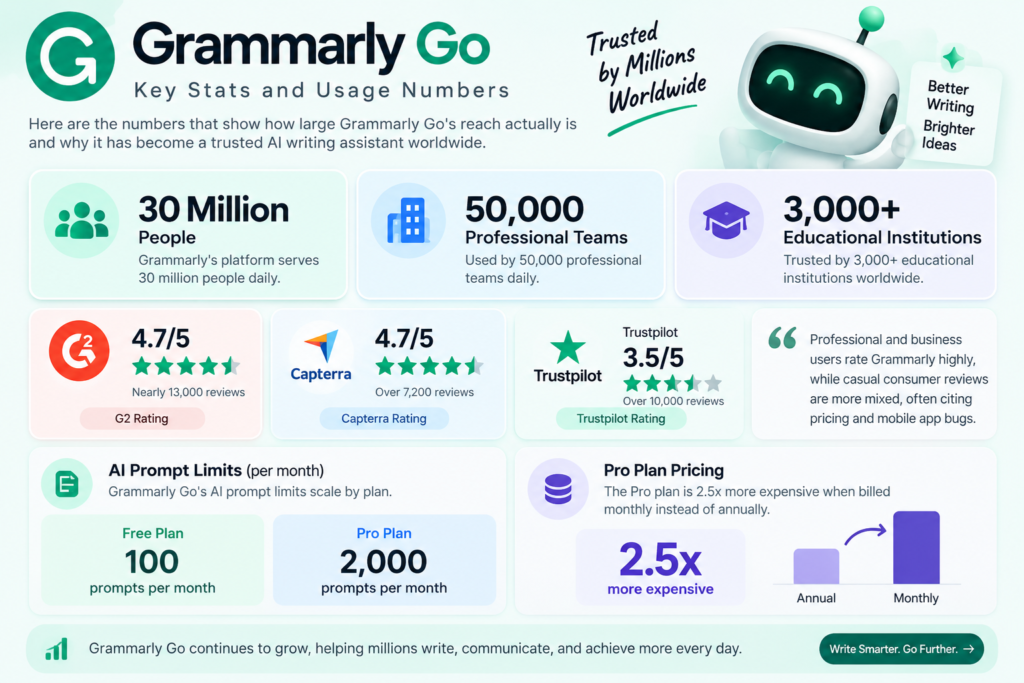
Here are the numbers that show how large its reach actually is:
- Grammarly’s platform serves 30 million people and 50,000 professional teams daily
- It is used across 3,000+ educational institutions worldwide
- Grammarly holds a 4.7/5 rating on G2 from nearly 13,000 reviews
- Capterra shows a similar 4.7/5 rating from over 7,200 reviews
- Trustpilot’s consumer score is lower, around 3.5/5 from over 10,000 reviews
- AI prompt limits scale by plan: 100/month on Free, up to 2,000/month on Pro
- The Pro plan is 2.5x more expensive when billed monthly instead of annually
The gap between G2, Capterra, and Trustpilot scores is worth noting. Professional and business users rate the platform highly, while casual consumer reviews are more mixed, often citing pricing and mobile app bugs.
Core Features
Its generative features go well beyond spelling and grammar fixes. The main capabilities include:
- Compose: generates a full draft from a one-line prompt
- Reply: creates short email or message responses in one click
- Rewrite: changes tone from formal to friendly to persuasive
- Personalize: adapts writing to your personal or brand voice over time
- Summarize: condenses long documents or threads into key points
- Ideate: suggests talking points or outlines before you start writing
- Length control: shortens or expands a draft with a single click
These features work inside Gmail, Google Docs, Microsoft Word, Slack, and most major browsers, so you do not need to switch tabs to use the assistant.
How to Get Started
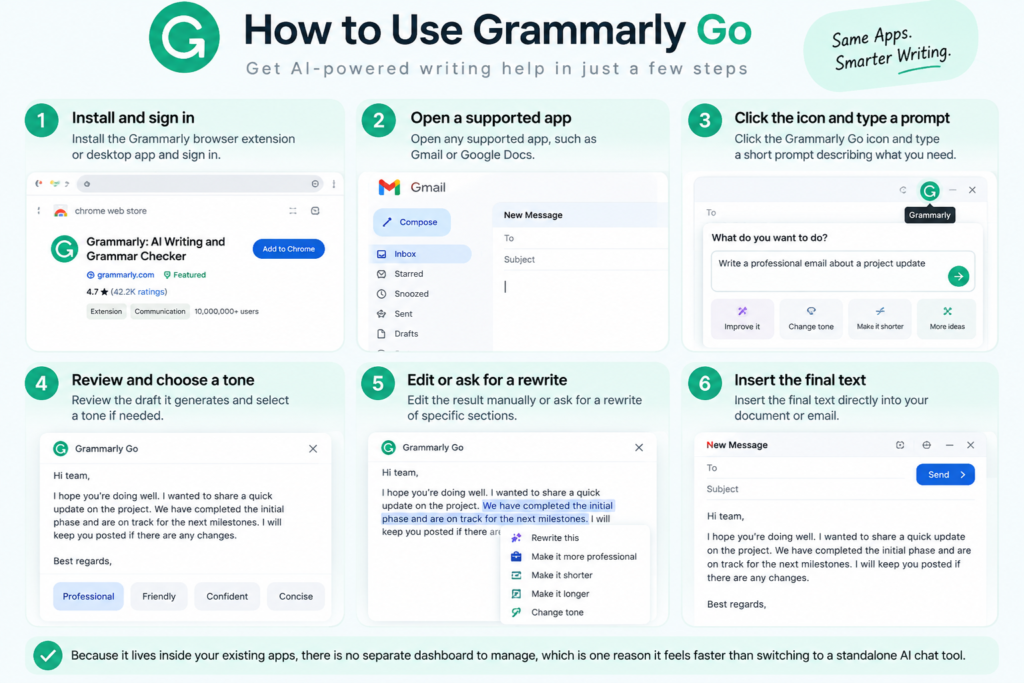
Getting started takes only a few minutes. Here is the basic workflow most users follow:
- Install the Grammarly browser extension or desktop app and sign in
- Open any supported app, such as Gmail or Google Docs
- Click the icon and type a short prompt describing what you need
- Review the draft it generates and select a tone if needed
- Edit the result manually or ask for a rewrite of specific sections
- Insert the final text directly into your document or email
Because it lives inside your existing apps, there is no separate dashboard to manage, which is one reason it feels faster than switching to a standalone AI chat tool.
Common Use Cases
This AI assistant is flexible enough to help across several different writing situations. Common use cases include:
- Work emails: quick replies, follow-ups, and status updates
- Academic writing: outlining essays and rephrasing unclear sentences
- Customer support: drafting consistent, on-brand responses faster
- Job applications: polishing cover letters and LinkedIn messages
- Internal documents: summarizing meeting notes or long reports
- Social captions: short-form posts that match a defined tone
It is not built for long-form blog articles or high-volume ad campaigns, which is where dedicated copywriting tools tend to perform better.
Pricing Breakdown (2026)
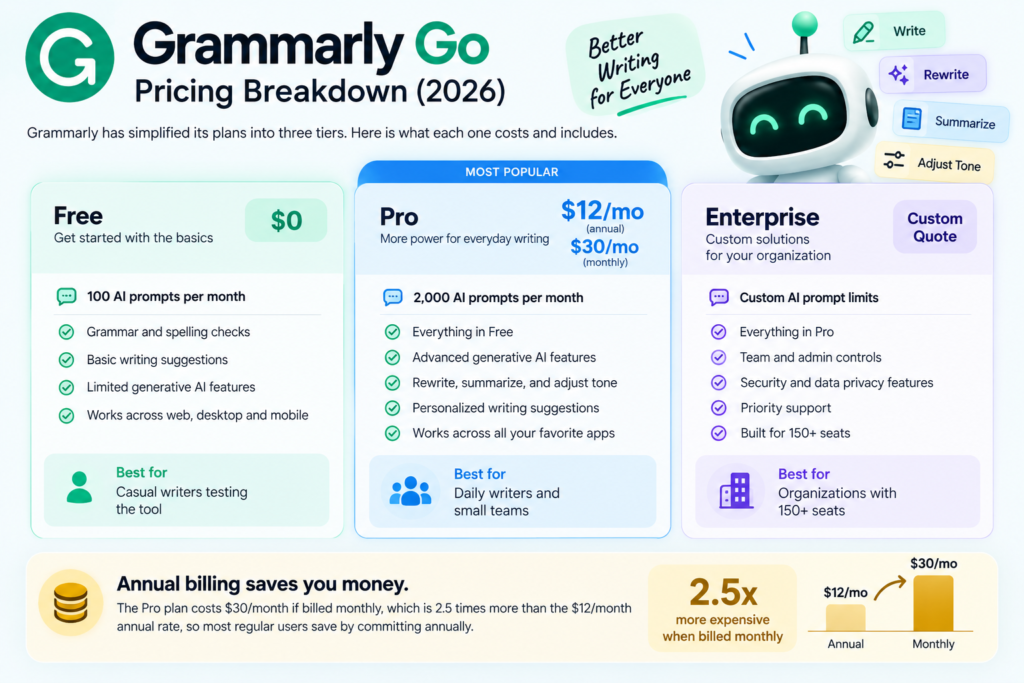
Grammarly simplified its plans in 2026 into three tiers. Here is what each one costs and includes.
| Plan | Price | AI Prompts | Best For |
|---|---|---|---|
| Free | $0 | 100/month | Casual writers testing the tool |
| Pro | $12/mo (annual) or $30/mo (monthly) | 2,000/month | Daily writers and small teams |
| Enterprise | Custom quote | Custom limits | Organizations with 150+ seats |
Annual billing is significantly cheaper than paying monthly. The Pro plan costs $30/month if billed monthly, which is 2.5 times more than the $12/month annual rate, so most regular users save by committing annually.
Pros and Cons
Before choosing this tool, it helps to weigh what it does well against where it falls short.
Pros:
- Works inside apps you already use, with no extra login
- The free plan includes real AI prompts, not just a locked demo
- Strong grammar and clarity checking layered underneath the generative features
- Consistent tone and personalization across long-term use
Cons:
- Not designed for long-form blog or article writing
- Monthly billing is priced high compared to annual billing
- Android app reviews are noticeably lower than iOS and desktop
- Limited to Grammarly’s ecosystem, unlike open AI chat tools
Grammarly Go vs Standalone AI Writing Tools
Grammarly Go is convenient because it lives inside tools you already use daily. It is not built to replace dedicated content platforms for long-form blog writing or ad copy generation.
Here is where it fits compared to purpose-built AI copywriting tools:
- Grammarly Go: best for everyday emails, quick rewrites, and tone fixes
- Anyword: better for predictive, conversion-focused ad and email copy
- Jasper: better for long-form, brand-consistent content across teams
- Rytr: better for affordable, high-volume short-form drafts
If your main need is writing correction with light AI assistance, it covers you well. If you need dedicated marketing copy or long-form articles, a specialized tool from our Marketing category will serve you better. You can also read our full breakdown of Anyword vs Jasper vs Rytr for a deeper comparison of copywriting-focused alternatives.
For readers evaluating Rytr as an alternative, our team published a hands-on Rytr Review 2026 that covers real usage beyond the marketing pages. There is also a full Writesonic Review 2026 if long-form content generation is your priority instead of grammar assistance.
Is Grammarly Go Worth It?
For daily writers, students, and professionals who send a lot of emails, the Pro plan pays for itself in saved editing time. The free plan is genuinely usable too, with 100 AI prompts a month before you need to upgrade.
For marketing teams that need dedicated ad copy, brand voice management, or long-form content at scale, it works better as a helpful add-on rather than a full replacement. Pairing it with a specialized copywriting tool from our AI tools directory often works best.
If you are still deciding between multiple AI writing options, our side-by-side comparison engine lets you evaluate this category alongside other verified tools using the same standardized pricing and feature data.
Frequently Asked Questions
Is Grammarly Go free to use? Yes. The free Grammarly plan includes it with 100 AI prompts per month. Upgrading to Pro raises the limit to 2,000 per month.
Is Grammarly Go the same as ChatGPT? No. It is purpose-built for writing assistance inside your existing apps, while ChatGPT is a general-purpose AI assistant. This tool focuses on drafting, rewriting, and tone adjustment within your workflow instead of open-ended conversation.
Does Grammarly Go count as AI for academic integrity? Yes. It generates new text from prompts, which is different from Grammarly’s standard grammar correction. Many schools treat generated or heavily rewritten text differently from basic grammar fixes, so it is worth checking your institution’s policy.
Can Grammarly Go replace a dedicated copywriting tool? For short emails and everyday writing, yes. For long-form content or high-volume ad copy, a dedicated tool tends to perform better. You can compare AI writing tools side-by-side to see which fits your workflow.
How much does Grammarly Go cost per month? It is included free with 100 monthly prompts or unlocked further on the Pro plan at $12/month billed annually. Enterprise pricing is custom-quoted for larger teams.
Looking for more AI writing tools? Browse our full Marketing category, check the Rytr Review 2026, or read our comparison of Anyword vs Jasper vs Rytr for more copywriting options. For a broader look at how tools stack up, see our Best AI Comparison Tools in 2026 roundup.
Discussion (0)
No comments yet. Start the discussion below!
Leave a Comment